March 23, 2017
Zipper List
A Zipper data structure allows you to focus on a part of a data structure and quickly move the focus among items.
Use Case
What we needed in our application was a data structure to keep track of a selected item among a list of items in our Elm model. The constraints were, at least one item must always be selected and the list must never be empty.
Initially, we went with two state variables, one which stores the list and the second that stores the selected id. This organization can lead to invalid states, such as when the selected id is an empty string. We had to check such conditions in our Elm code, which made it tedious. The second constraint meant that we had to check the length of the list whenever removing items.
We wanted to embed these constraints in the data structure itself. If you are thinking why is this helpful, look at these excellent talks,
- Effective ML by Yaron Minsky
- Making Impossible States Impossible by Richard Feldman
Solution
We ended up using the Zipper List which fulfills both these constraints.
The Zipper List divides a list into three parts, list before the selected item, selected item and items after selected item. It may look something like
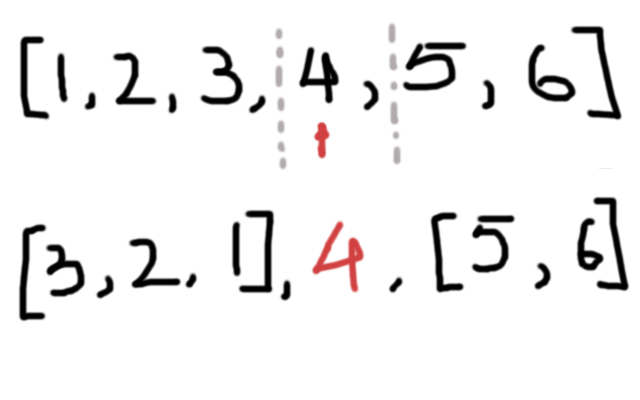
Notice the first part of the list is stored in reverse order. This helps simplify the implementation of moving focus to the previous and next item.
Implementation
A representation of a Zipper List structure in Elm contains the three parts.
type Zipper a = Zipper (List a) a (List a)Getting the currently selected item is just as easy as reading a single variable. The corresponding Elm code is just,
current : Zipper a -> a
current (Zipper _ x _) = xNote: The code we present below has the error checking parts removed to keep things simple.
Moving Focus
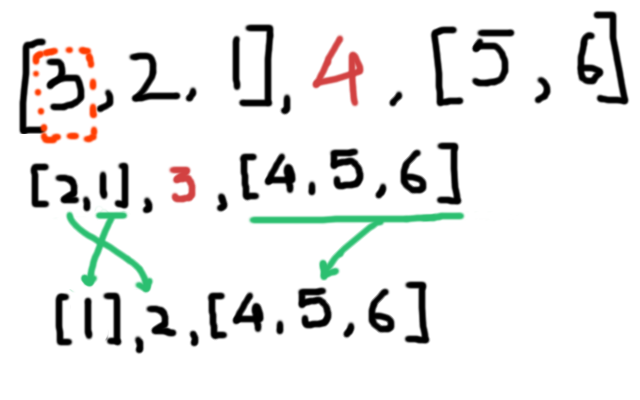
Moving focus to a different item is just a matter of building a new Zipper by rearranging the three parts. Such as to move focus to the previous element, the operation will be:
- Get tail (all but first) of the left part and set it as left part of new Zipper
- Get head (first item) of the left part and set it as selected item, and
- Concatenate the selected item and the right part and set it as right part of the new zipper.
Perhaps a picture will make this clear:
The corresponding Elm code is (note: the error checking parts are removed to keep things simple)
previous : Zipper a -> Zipper a
previous (Zipper ls x rs) = Zipper (tail ls) (head ls) (x :: rs)
Similarly moving to next item is also easy
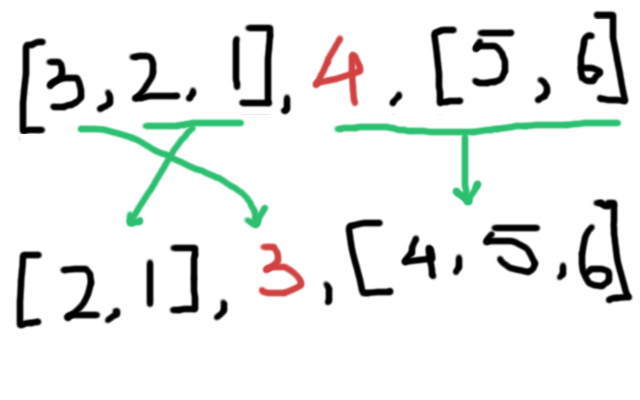
next : Zipper a -> Zipper a
next (Zipper ls x rs) = Zipper (x :: ls) (head rs) (tail rs)
Removing Items
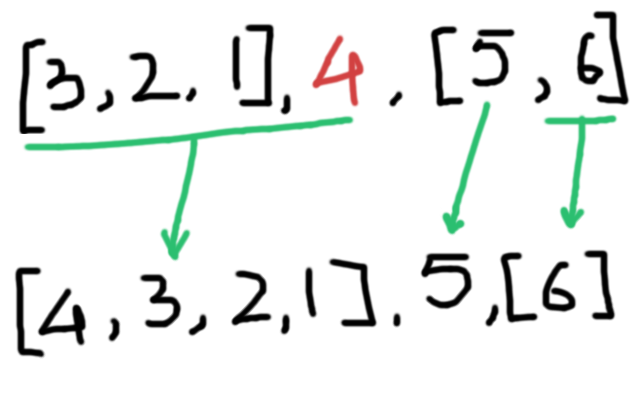
Let us look at a more complex operation, removing an item from the Zipper. This requires first finding the element that needs to be removed based on a predicate function, focusing on it, and then rearranging the Zipper. The below cases list out the cases that need to be handled while rearranging. Note these cases should be checked on the Zipper with focus on the item that needs to be removed.
- If there is only one item in the Zipper then we cannot remove anything as that would violate the second constraint, so return the original Zipper.
- If the left side is empty, then keep the left side empty, select the first item from the right side and the rest of the right side becomes the new right side.
- If there are some items in the left side set the first item from the left side as the selected item and rest of left side becomes the new left side.
If the item to be removed cannot be found just return the existing Zipper. In the example number 3 is removed from the list.
Conclusion
If you are confused about where to use a Zipper List, think whether your data has the following constraints,
- There is always one selected item.
- There is at least one item in the list at all times.
If these are true, a Zipper list is probably a good choice for your data.
A Zipper is not only useful for lists but can be used along with other data structures, like trees. You can also focus on a sub-list rather than a single item in a list. Such a Zipper will have the following structure.
type Zipper a = Zipper (List a) (List a)where the first list is the sub-list, you want to focus.
References
Check out the following resources to learn more about the Zipper.
- Functional Pearl: The Zipper – the original paper
- Zippers, Learn You a Haskell for Great Good – great explanation with cool pictures
- List Zipper library in Elm - we are using code from this library with few of our own additional functions
Exercises
- Draw the changes required to move focus to first and last item.
- Think about the error cases for next and previous operations.