October 02, 2017
Adventures with AWS Lambda
Being a Creative Management Platform, our product is engineered to help Creative Designers and AdOps with their day to day activities. All features revolve around Campaign and Creatives.
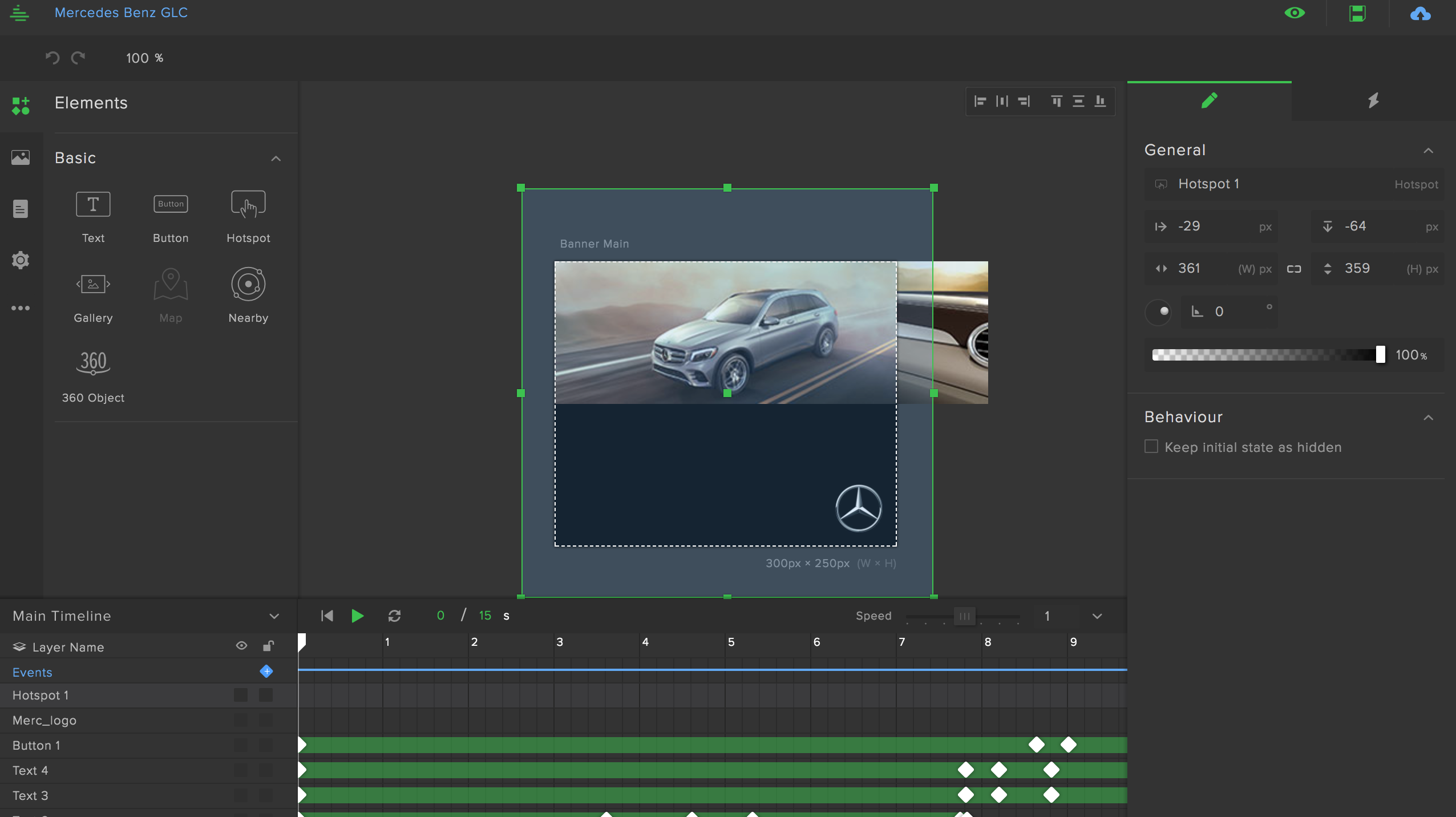
A Creative is like a mini html5 page that gets displayed on websites, mobile applications as advertisement. The image below is a snapshot taken while a designer was building the creative.The editor used to build the creative is called the Canvas. The final output of the work displayed in the image can be viewed here.
With so much activity happening around the product, there was a need to show a screenshot of the final ad unit to the user without needing them to edit the creative inside the canvas. The intention was to show a small image that would give an idea about what’s inside
We have done some cool stuff using Phantom JS and Imagemagick to make this happen. However we will leave that to another blog post. The current article focuses on how we could leverage AWS lambda to address the screenshot use case.
The Problem
The process of generating a screenshot was fairly simple. Once a Creative Designer is finished building a creative, all he has to do is click on a button called “Publish” to commit the changes made during the session.
The publish api would do whats required like authorise, validate and save the state. Towards the end however it would call another service in an async fashion to take the screenshot of the state update.
On request the screenshot api would
- Render the creative on a blank page.
- Wait for a few seconds assets and other content to load.
- Take a snapshot of the page.
- Clip the region required for the screenshot.
- Push the image to a S3 bucket.
- Return the CDN url back to the core api acknowledging that the process succeeded.
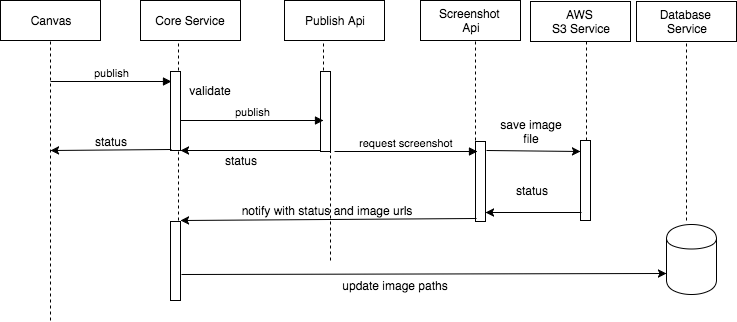
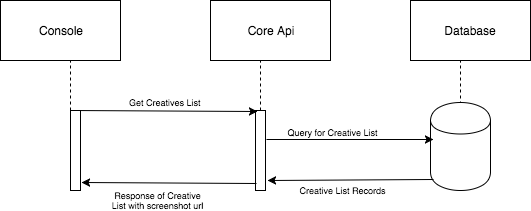
If all activities in this sequence execute without an error then the front end application on its next api request gets the image url as a part of the creative response.
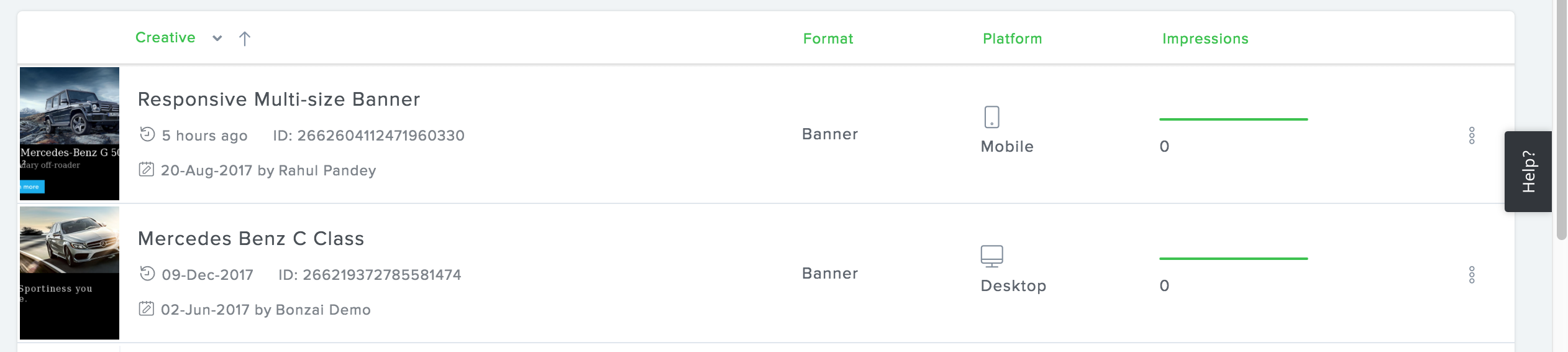
An absence of screenshot is gracefully managed by showing a backup image.

A successful request would display the following view to the user.

While the screenshot service was working as expected . It had some design challenges.
- The service had to be hosted behind dedicated EC2 (C3-Large)
- The request would spike up by 80% during peak hours and and come down gradually over the day.
- The service required monitoring and had to be put behind autoscaling to ensure availability.
- We had to limit the request per second via a queuing mechanism.Failing which an increase in load would trigger the autoscaling that would further add resources and mount up the cost.
AWS Lambda to the rescue
With the application already operational an engineer took up the challenge to port the service to AWS Lambda. Since the entire design is based on a fire and forget principle Lambda was the right candidate for the job.
For all newbies AWS Lambda is a service offered by Amazon that advertises on being serverless. The idea being you can run small utility that can remain stateless. You will be charged only for the compute time and other resources that you may have utilised for a given time. Also compute and other resources can be adjusted on the fly
Luckily for us Lambda supports Node JS and we worked on a small prototype to check if things work for us. To make the Lambda service RESTFUL we had to attach it to an API Gateway.The following article was of an immense help to get started.
At first we struggled a bit in configuring the right roles and permissions for the api to use S3 and AWS Gateway, but a week of hacking and we successfully moved out application out of EC2 instances to a AWS Lambda. Server to Serverless in a week.
We have now extended the scope of the product to uses these images and plot user clicks and activities above these images. We have called it heat maps and it gives an important insight to our users.
Objectives Achieved
Now that you have read this article so far, It would be unfair to disclose what we achieved out all this.
- We had cut down our AWS cost from 100+ dollars to single digits.
- With the elimination of queues the application logic became more lighter and simple.
- We almost forgot about scaling, something that has always kept us occupied. All complexities around scaling is very well managed by the Lambda (at least for our current use case).
- We have identified a few more apis that fit this pattern and are converting those to lambda services to bring down the cost.
While the currently limited to share the source code we do have plans to publish few our projects on github to share our experience.We are currently exploring Lambda@Edge to address our latency challenges and we promise to keep you updated through our blog posts.